


- May 31, 2020
- 2,763
- 1,592
- $11,679
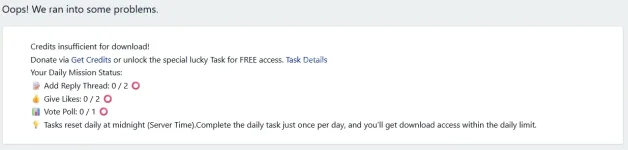
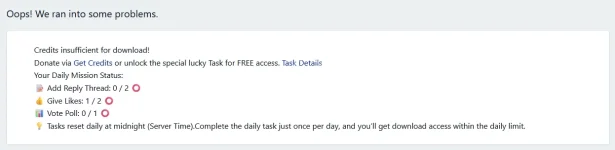
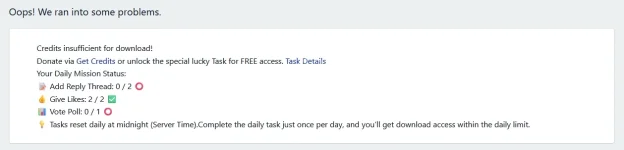
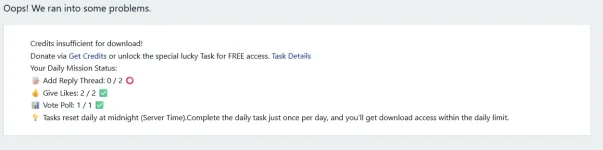
Tested again .no find any issue when content was touch Daily MissionAs I understand it, it only works Add Reply Thread. Give Likes, Vote Poll and Bookmarks don't work. what a good system🙂


- Mar 9, 2024
- 1
- 0
- $1
This member @foueddhouibi329 contributed to the discussion at post #53 with a short message.
- Jun 25, 2026
- 2
- 0
- $1
This member @hatebreeder contributed to the discussion at post #54 with a short message.

- Jun 25, 2026
- 1
- 0
- $1
okHello Community,
Complete today's tasks to get free downloads up to your membership tier's maximum limit!
We have introduced a new Daily Guild Mission system! If you are running low on credits, you don't need to worry. You can now unlock downloads for FREE by completing simple daily activities.
Your mission list is unique every day. Here is a detailed guide on where to find and how to complete each task type:
📋 Mission Guide: How to Complete Your Tasks
1. 📝 Post Replies (Join the Discussion)
- The Mission: Reply to existing threads or create new ones.
- Where to find: Click the "New Posts" or "What's New" button in the navigation bar.
- How to do it:
- Open any thread that interests you.
- Scroll to the bottom text box.
- Type your thoughts and click "Post reply".
- Note: "Thanks" or spam posts do not count and may be deleted.
2. ⭐ Write Reviews (Rate Resources)
- The Mission: Rate and review a file in the Resource Manager.
- Where to find: Click the "Resources" tab in the main menu.
- How to do it:
- Open a resource page (a file/plugin/theme).
- Look for the "Rate this resource" button (usually on the right sidebar or top right).
- Select a Star Rating and write a short comment about your experience.
- Important: Replying to the discussion thread does not count as a Review! You must use the Rating button.
3. 💬 Profile Chat (Interact with Members)
- The Mission: Leave a message on another user's profile wall.
- Where to find: Click on any user's name or avatar anywhere in the forum.
- How to do it:
- Go to their Profile Page.
- Find the text box that says "Write a message on [User]'s profile...".
- Say hello, ask a question, or thank them, then click "Post".
4. 📌 Bookmark Content (Save for Later)
- The Mission: Bookmark a useful post or resource.
- Where to find: Look at the top-right corner of any single post message.
- How to do it:
- Find the small Bookmark Icon (looks like a flag or tag).
- Click it.
- Add a note (optional) and save. You have now bookmarked it!
5. 📊 Vote in Polls (Share Your Opinion)
- The Mission: Cast a vote in an active poll.
- Where to find:This can be tricky! The easiest way:
- Go to the Forum List.
- Look for threads with a Bar Graph Icon 📊 next to the title.
- Pro Tip: Use the Advanced Search, select "Threads", and check the option "Create a poll" to find them all.
- How to do it:
- Open the thread.
- Select an option in the voting box at the top.
- Click "Cast vote".
- Vote Content https://www.nullpro.net/threads/what-is-best-program-language.32995/ sure you can submit new one Poll Thread to do that
💡 Reminders:
Happy Questing! Let's make the community more active together.
- Real-Time Tracking: As soon as you finish the task, the download unlocks immediately.
- Daily Reset: New missions are assigned every day at Midnight (Server Time).
niceHello Community,
Complete today's tasks to get free downloads up to your membership tier's maximum limit!
We have introduced a new Daily Guild Mission system! If you are running low on credits, you don't need to worry. You can now unlock downloads for FREE by completing simple daily activities.
Your mission list is unique every day. Here is a detailed guide on where to find and how to complete each task type:
📋 Mission Guide: How to Complete Your Tasks
1. 📝 Post Replies (Join the Discussion)
- The Mission: Reply to existing threads or create new ones.
- Where to find: Click the "New Posts" or "What's New" button in the navigation bar.
- How to do it:
- Open any thread that interests you.
- Scroll to the bottom text box.
- Type your thoughts and click "Post reply".
- Note: "Thanks" or spam posts do not count and may be deleted.
2. ⭐ Write Reviews (Rate Resources)
- The Mission: Rate and review a file in the Resource Manager.
- Where to find: Click the "Resources" tab in the main menu.
- How to do it:
- Open a resource page (a file/plugin/theme).
- Look for the "Rate this resource" button (usually on the right sidebar or top right).
- Select a Star Rating and write a short comment about your experience.
- Important: Replying to the discussion thread does not count as a Review! You must use the Rating button.
3. 💬 Profile Chat (Interact with Members)
- The Mission: Leave a message on another user's profile wall.
- Where to find: Click on any user's name or avatar anywhere in the forum.
- How to do it:
- Go to their Profile Page.
- Find the text box that says "Write a message on [User]'s profile...".
- Say hello, ask a question, or thank them, then click "Post".
4. 📌 Bookmark Content (Save for Later)
- The Mission: Bookmark a useful post or resource.
- Where to find: Look at the top-right corner of any single post message.
- How to do it:
- Find the small Bookmark Icon (looks like a flag or tag).
- Click it.
- Add a note (optional) and save. You have now bookmarked it!
5. 📊 Vote in Polls (Share Your Opinion)
- The Mission: Cast a vote in an active poll.
- Where to find:This can be tricky! The easiest way:
- Go to the Forum List.
- Look for threads with a Bar Graph Icon 📊 next to the title.
- Pro Tip: Use the Advanced Search, select "Threads", and check the option "Create a poll" to find them all.
- How to do it:
- Open the thread.
- Select an option in the voting box at the top.
- Click "Cast vote".
- Vote Content https://www.nullpro.net/threads/what-is-best-program-language.32995/ sure you can submit new one Poll Thread to do that
💡 Reminders:
Happy Questing! Let's make the community more active together.
- Real-Time Tracking: As soon as you finish the task, the download unlocks immediately.
- Daily Reset: New missions are assigned every day at Midnight (Server Time).
thank youHello Community,
Complete today's tasks to get free downloads up to your membership tier's maximum limit!
We have introduced a new Daily Guild Mission system! If you are running low on credits, you don't need to worry. You can now unlock downloads for FREE by completing simple daily activities.
Your mission list is unique every day. Here is a detailed guide on where to find and how to complete each task type:
📋 Mission Guide: How to Complete Your Tasks
1. 📝 Post Replies (Join the Discussion)
- The Mission: Reply to existing threads or create new ones.
- Where to find: Click the "New Posts" or "What's New" button in the navigation bar.
- How to do it:
- Open any thread that interests you.
- Scroll to the bottom text box.
- Type your thoughts and click "Post reply".
- Note: "Thanks" or spam posts do not count and may be deleted.
2. ⭐ Write Reviews (Rate Resources)
- The Mission: Rate and review a file in the Resource Manager.
- Where to find: Click the "Resources" tab in the main menu.
- How to do it:
- Open a resource page (a file/plugin/theme).
- Look for the "Rate this resource" button (usually on the right sidebar or top right).
- Select a Star Rating and write a short comment about your experience.
- Important: Replying to the discussion thread does not count as a Review! You must use the Rating button.
3. 💬 Profile Chat (Interact with Members)
- The Mission: Leave a message on another user's profile wall.
- Where to find: Click on any user's name or avatar anywhere in the forum.
- How to do it:
- Go to their Profile Page.
- Find the text box that says "Write a message on [User]'s profile...".
- Say hello, ask a question, or thank them, then click "Post".
4. 📌 Bookmark Content (Save for Later)
- The Mission: Bookmark a useful post or resource.
- Where to find: Look at the top-right corner of any single post message.
- How to do it:
- Find the small Bookmark Icon (looks like a flag or tag).
- Click it.
- Add a note (optional) and save. You have now bookmarked it!
5. 📊 Vote in Polls (Share Your Opinion)
- The Mission: Cast a vote in an active poll.
- Where to find:This can be tricky! The easiest way:
- Go to the Forum List.
- Look for threads with a Bar Graph Icon 📊 next to the title.
- Pro Tip: Use the Advanced Search, select "Threads", and check the option "Create a poll" to find them all.
- How to do it:
- Open the thread.
- Select an option in the voting box at the top.
- Click "Cast vote".
- Vote Content https://www.nullpro.net/threads/what-is-best-program-language.32995/ sure you can submit new one Poll Thread to do that
💡 Reminders:
Happy Questing! Let's make the community more active together.
- Real-Time Tracking: As soon as you finish the task, the download unlocks immediately.
- Daily Reset: New missions are assigned every day at Midnight (Server Time).

- Jul 7, 2026
- 1
- 0
- $1
This member @marknguyen contributed to the discussion at post #58 with a short message.

- Jul 12, 2026
- 1
- 0
- $0
HaiHalo Komunitas,
Selesaikan tugas hari ini untuk mendapatkan unduhan gratis hingga batas maksimum tingkat keanggotaan Anda!
Kami telah memperkenalkan sistem Misi Guild Harian yang baru ! Jika kredit Anda menipis, Anda tidak perlu khawatir. Sekarang Anda dapat membuka unduhan secara GRATIS dengan menyelesaikan aktivitas harian sederhana.
Daftar misi Anda unik setiap hari. Berikut panduan detail tentang di mana menemukan dan bagaimana menyelesaikan setiap jenis tugas:
📋 Panduan Misi: Cara Menyelesaikan Tugas Anda
1. 📝 Balas Postingan (Bergabunglah dalam Diskusi)
- Misi: Balas utas yang sudah ada atau buat utas baru.
- Cara menemukannya: Klik tombol "Postingan Baru" atau "Apa yang Baru" di bilah navigasi.
- Cara melakukannya:
- Buka utas diskusi apa pun yang menarik minat Anda.
- Gulir ke kotak teks paling bawah.
- Ketikkan pemikiran Anda dan klik "Kirim balasan" .
- Catatan: Unggahan "Terima kasih" atau spam tidak dihitung dan dapat dihapus.
2. ⭐ Tulis Ulasan (Beri Nilai Sumber Daya)
- Misi: Memberi peringkat dan meninjau sebuah file di Pengelola Sumber Daya.
- Cara menemukannya: Klik tab "Sumber Daya" di menu utama.
- Cara melakukannya:
- Buka halaman sumber daya (file/plugin/tema).
- Cari tombol "Beri peringkat sumber daya ini" (biasanya di bilah sisi kanan atau kanan atas).
- Pilih peringkat bintang dan tulis komentar singkat tentang pengalaman Anda.
- Penting: Membalas utas diskusi tidak dihitung sebagai Ulasan! Anda harus menggunakan tombol Peringkat.
3. 💬 Obrolan Profil (Berinteraksi dengan Anggota)
- Misi: Tinggalkan pesan di dinding profil pengguna lain.
- Cara menemukannya: Klik pada nama atau avatar pengguna mana pun di forum.
- Cara melakukannya:
- Kunjungi halaman profil mereka.
- Temukan kotak teks yang bertuliskan "Tulis pesan di profil [Pengguna]..." .
- Sapa mereka, ajukan pertanyaan, atau ucapkan terima kasih, lalu klik "Kirim" .
4. 📌 Tandai Konten (Simpan untuk Nanti)
- Misi: Tandai postingan atau sumber daya yang bermanfaat.
- Cara menemukannya: Lihat di pojok kanan atas setiap pesan postingan.
- Cara melakukannya:
- Cari ikon Bookmark kecil (terlihat seperti bendera atau label).
- Klik itu.
- Tambahkan catatan (opsional) dan simpan. Anda sekarang telah menambahkan halaman ini ke bookmark!
5. 📊 Berikan Suara Anda di Polling (Bagikan Pendapat Anda)
- Misi: Berikan suara Anda dalam jajak pendapat yang sedang berlangsung.
- Di mana mencarinya: Ini bisa jadi sulit! Cara termudah:
- Buka Daftar Forum.
- Carilah thread yang memiliki ikon grafik batang 📊 di samping judulnya.
- Tips Pro: Gunakan Pencarian Lanjutan , pilih "Thread", dan centang opsi "Buat jajak pendapat" untuk menemukan semuanya.
- Cara melakukannya:
- Buka percakapan tersebut.
- Pilih salah satu opsi di kotak suara di bagian atas.
- Klik "Berikan suara" .
- Konten Pemungutan Suara https://www.nullpro.net/threads/what-is-best-program-language.32995/ Tentu, Anda dapat mengirimkan yang baru. Utas Polling untuk melakukannya.
💡 Pengingat:
Selamat berpetualang! Mari kita bersama-sama membuat komunitas lebih aktif.
- Pelacakan Waktu Nyata: Begitu Anda menyelesaikan tugas, unduhan akan langsung terbuka.
- Reset Harian: Misi baru diberikan setiap hari pada tengah malam (Waktu Server) .
Similar threads
- Replies
- 0
- Views
- 53
- Replies
- 2
- Views
- 260


- Replies
- 1
- Views
- 205

- Replies
- 0
- Views
- 13