
![[AndyB] Page background manager](/data/resource_icons/20/20131.jpg?1720149340)
- XF Compatibility
- 2.3.x
- 2.2.x
- Short Description
- Automatically rotates page backgrounds. Setup includes choosing a style ID, uploading images, updating Options page. Backgrounds rotate randomly once per hour; default can be restored via admin settings.
Automatically rotates page background.
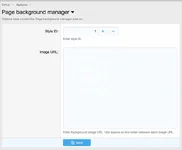
(Example of Options page)
Setup:
Q: How are the background images selected?
A: Randomly.
Q: How often are the background images rotated?
A: Once per hour.
Q: How can I revert to the default back background?
A: Go to the following location and revert the style property:
Admin control panel -> Appearance -> Style properties -> Page setup -> Page background
more infomation link
https://www.xf2addons.com/resources/page-background-manager.769/
(Example of Options page)
Setup:
- Identify the style ID that will have rotating background images. The add-on will only rotate background images on only one style.
- Upload the background images to your server.
- Update the Options page.
Q: How are the background images selected?
A: Randomly.
Q: How often are the background images rotated?
A: Once per hour.
Q: How can I revert to the default back background?
A: Go to the following location and revert the style property:
Admin control panel -> Appearance -> Style properties -> Page setup -> Page background
more infomation link
https://www.xf2addons.com/resources/page-background-manager.769/


![[AndyB] Header background manager](/data/resource_icons/26/26269.jpg?1760246583)
![[AndyB] Ad manager](/data/resource_icons/8/8631.jpg?1720149279)
![[AndyB] Affiliate manager](/data/resource_icons/4/4391.jpg?1720149256)