
![[AndyB] Ad manager](/data/resource_icons/8/8631.jpg?1720149279)
- XF Compatibility
- 2.2.x
- Short Description
- Manage your Google AdSense ads with ease. Log in, create a responsive horizontal ad unit, and set up data-ad-client values on the Options page for optimal visibility. Exclude guest-accessible forums for better user experience.
Manages your Google AdSense advertising.
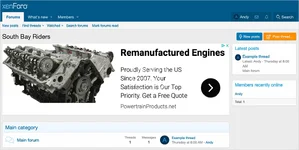
(Example of ad on forum list)
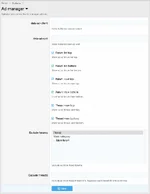
(Example of Options page)
(Example of User group permissions)

Get your AdSense code:
User group permissions:
View = show ads to this user group
Questions & Answers:
Q: Should I exclude forums which guests are not able to view?
A: Yes.
(Example of ad on forum list)
(Example of Options page)
(Example of User group permissions)
Get your AdSense code:
- Log into your Google AdSense account.
- Click Ads.
- Click Ad units.
- Click By ad unit.
- Click Display ads.
- Name your ad unit = Responsive
- Click Horizontal
- Click Create.
User group permissions:
View = show ads to this user group
Questions & Answers:
Q: Should I exclude forums which guests are not able to view?
A: Yes.


![[AndyB] Affiliate manager](/data/resource_icons/4/4391.jpg?1720149256)
![[AndyB] Attachment Manager](/data/resource_icons/4/4500.jpg?1720149262)
![[AndyB] Auto ads manager](/data/resource_icons/11/11137.jpg?1720149290)