

- Short Description
- Unlock advanced customer data collection with the WooCommerce User Registration Extension - add custom fields, choose from 14 field types, and manage user roles seamlessly. Automatically approve or manually validate new users for secure B2B transactions. Compatible with all third-party extensions.
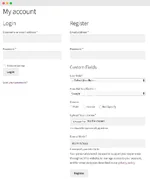
The WooCommerce User Registration Extension lets you collect extra information from your customers by adding custom fields to your registration form. Add dropdowns, multi-select options, checkboxes, file uploads, dates, and more. Display the fields on “My Account” page, and make them either required or optional.
You can also add a “user roles” dropdown menu to registration forms to let the customers select an appropriate role during registration — you can choose to display all or just specific user roles in the dropdown. Auto-approve new user registrations, or do it manually, which is particularly handy if you need to validate B2B customers before allowing them to log in and place orders. Tag fields with specific user roles and show them only when a customer selects a specific role from dropdown.
Key features of WooCommerce Registration Extension
Add unlimited extra fields to your registration form
Add fields to WordPress and WooCommerce signup forms
Show field data on a user’s “My Account” page and in registration emails
Choose from 14 field types
Choose whether to display a “user roles” dropdown menu on your registration form
Display all or specific user roles in the dropdown
Select from auto or manual approval for user roles
Manually approve new user registrations
Send automated email notifications to admins and customers
Compatible with all third-party user role extensions
Add fields dependable to user roles
Enable default registration fields
Add multiple custom registration fields
You can add multiple fields and position them anywhere on your user signup form. If WooCommerce is active on your site, the fields will be displayed on WooCommerce registration form; if WooCommerce is inactive, the same fields will display on the WordPress registration form.


