![[AndyB] Delete Conversations](/data/resource_icons/1/1283.jpg?1682888164)
- Headline
- All phrases start with deleteconversations_ for your convenience.
- Short Description
- FREE Download Premium and Nulled [AndyB] Delete Conversations 1.3 version from NullPro Community. It is zip Extention type and 21.5 KB File size. From [AndyB] Delete Conversations have 1 Description Attachments, 206 Views.
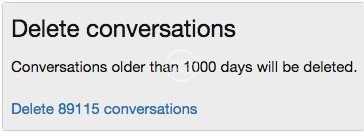
Delete conversations by date.
Features:
- All phrases start with deleteconversations_ for your convenience.
- Download Andy-DeleteConversations-1.1.zip and unzip it.
- Copy the src/addons/Andy/DeleteConversations directory to your server.
- From the Admin Control Panel Install the add-on.
- Add "deleteconversations" to your forum URL in the browser.
- Confirm the number of conversations to be deleted and click the link to delete them.
Q: How are conversations selected?
A: In the Options page by default any conversation which has a last message date older than 1000 days will be selected for deletion.
Q: Do I need to be an admin to use this add-on?
A: Yes


![[AndyB] Auto delete conversations](/data/resource_icons/17/17883.jpg?1701543916)
![[AndyB] Delete all tags](/data/resource_icons/11/11798.jpg?1682886122)
![[AndyB] Auto delete](/data/resource_icons/7/7411.jpg?1682883007)