

- XF Compatibility
- 2.3.x
- 2.2.x
- Short Description
- Enhance web navigation for assistive device users with large header/footer buttons. Customize quick links like What's new, New posts, Conversations, and dynamic thread-specific controls such as First post, Last post. Easily update button color via wutime_accblock.less template.
Large header/footer navigation buttons for people that use assistive devices to navigate the web (eye gaze, foot mouse, etc). These types of users often have miss-clicks and issues navigating default Xenforo.
By default, the buttons do not show. If a user chooses to enable them, they do so by enabling the option under their personal preferences.
The buttons include 3 by default and 2 dynamic as follows:
Quick links to the most popular pages:
What's new
New posts
Conversations
When on a thread, two more buttons render:
First post
Last post
The button color can be updated in the wutime_accblock.less template.
All wording uses the default phrases for pages, with two additional phrases added for "Last post" and "First post".
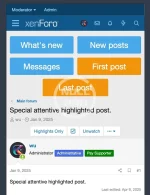
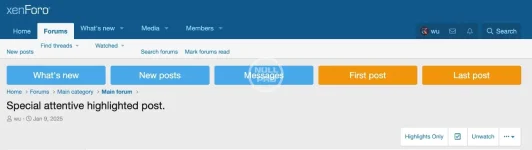

By default, the buttons do not show. If a user chooses to enable them, they do so by enabling the option under their personal preferences.
The buttons include 3 by default and 2 dynamic as follows:
Quick links to the most popular pages:
What's new
New posts
Conversations
When on a thread, two more buttons render:
First post
Last post
The button color can be updated in the wutime_accblock.less template.
All wording uses the default phrases for pages, with two additional phrases added for "Last post" and "First post".


![[AddonsLab] Navigation Badge](/data/resource_icons/1/1090.jpg?1720149240)
![[cXF] Logo in Navigation](/data/resource_icons/1/1401.jpg?1720149245)
![[cXF] Style Variations in Navigation](/data/resource_icons/20/20390.jpg?1720149340)