
![[XFSkins] Thread Rating](/data/resource_icons/28/28143.jpg?1786210712)
- Description courte
- Topic Rating plugin adds a clean and easy-to-understand star rating system to XenForo topics
Hello everyone,
The [XFSkins] Topic Rating plugin adds a clean and easy-to-understand star rating system to XenForo topics, while keeping the experience close to XenForo's native style. The idea is simple: members can rate topics from 1 to 5 stars, the average rating and total number of votes are displayed on the topic page, and the highest-rated topics can be highlighted via a widget.
This plugin is especially useful for communities that love the classic vBulletin topic review experience and want to bring that idea to XenForo in a more modern, native-looking, and manageable way.
Subject rating area

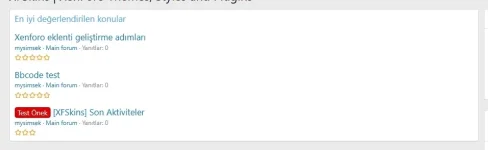
Most liked threads widget
Local XenForo alert integration

This tool does more than just list the highest average scores. It follows a natural order of priority. For example, if the tool is structured to show 10 subjects, it will list 5-star subjects first. If there aren't enough 5-star subjects, it will proceed with 4-star subjects, then 3, 2, and 1-star subjects.
This helps valuable and highly-rated content automatically become more visible across the forum.
When a member evaluates a topic, the topic creator receives a notification via XenForo's own alert system. For example:
Test_Bora rated your topic titled "Bbcode test" as Good.
This plugin does not use a separate custom notification layer; it works with XenForo's built-in alerting engine.
The plugin includes its own style attribute set. The rating box, label, selected button, and star color can be adjusted via XenForo's style system. If no custom style is applied, the output remains consistent with XenForo's native appearance.
All interface text is based on phrases.
The [XFSkins] Topic Rating plugin adds a clean and easy-to-understand star rating system to XenForo topics, while keeping the experience close to XenForo's native style. The idea is simple: members can rate topics from 1 to 5 stars, the average rating and total number of votes are displayed on the topic page, and the highest-rated topics can be highlighted via a widget.
This plugin is especially useful for communities that love the classic vBulletin topic review experience and want to bring that idea to XenForo in a more modern, native-looking, and manageable way.
- Subject-based 1-5 star rating system.
- The topic creators cannot evaluate their own topics.
- Voting controls are only shown to members who are eligible to vote on the topic.
- The topic heading displays the average rating, total number of votes, and number of views.
- When a member evaluates a topic, the topic creator receives a built-in alert from XenForo.
- It includes a widget to list the highest-scoring subjects.
- This tool lists topics with 5 stars first, followed by 4, 3, 2, and 1 stars.
- The number of threads displayed in the widget can be configured from the admin panel.
- All plugin interface text uses XenForo terminology, which uses English as the default language.
- A dedicated set of style attributes allows the appearance to be customized through XenForo's style system.
- Since no specific style changes have been made, the plugin retains XenForo's original visual appearance.
Subject rating area
Most liked threads widget
Local XenForo alert integration
This tool does more than just list the highest average scores. It follows a natural order of priority. For example, if the tool is structured to show 10 subjects, it will list 5-star subjects first. If there aren't enough 5-star subjects, it will proceed with 4-star subjects, then 3, 2, and 1-star subjects.
This helps valuable and highly-rated content automatically become more visible across the forum.
When a member evaluates a topic, the topic creator receives a notification via XenForo's own alert system. For example:
Test_Bora rated your topic titled "Bbcode test" as Good.
This plugin does not use a separate custom notification layer; it works with XenForo's built-in alerting engine.
The plugin includes its own style attribute set. The rating box, label, selected button, and star color can be adjusted via XenForo's style system. If no custom style is applied, the output remains consistent with XenForo's native appearance.
All interface text is based on phrases.

![[FF] Login Spaminator Admin Area Logs](/data/resource_icons/13/13199.jpg?1720149301)
![[Bypass MC Admin Login]](/data/resource_icons/27/27901.jpg?1782007500)

![[XTR] Thread Rating System](/data/resource_icons/4/4970.jpg?1735141127)
