- Whmcs Compatibility
- 7.x
- 8.x
- Short Description
- Free messaging app for real-time website visitor chat. Gain insights, increase conversions, stay connected with tawk.to—monitor and interact from anywhere. Compatible across browsers, integrate seamlessly with WHMCS for over 4 million users. Free forever; add to your site easily via WHMCS admin panel.
Free Messaging App to monitor and chat with site visitors
Gain valuable insights when you monitor and chat with website visitors in real time.Greet new and returning visitors, help them through pain points, and message before they leave your page.
Stay connected anywhere and respond to your customers from your computer or mobile device.
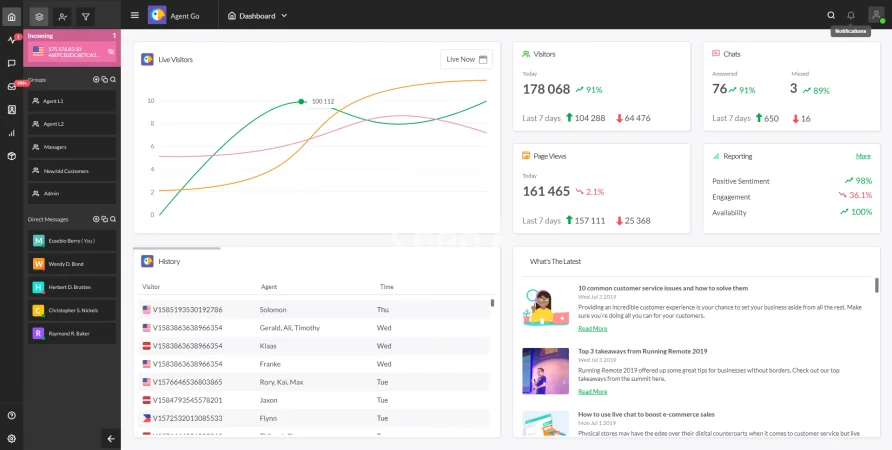
The tawk.to Live Chat app makes it easy to monitor and chat with visitors on your website. Be there when they need you with unlimited messaging, ticketing and your own Knowledge Base — all 100% FREE.
Compatible with all modern browsers, tawk.to was created in response to the growing need for businesses to respond in real time, with real people.
Never lose another lead or sale again — tawk.to offers iOS, Android, Windows and Mac OSX apps to keep you connected wherever you go.
tawk.to’s live chat app integrates seamlessly with WHMCS. More than 4 million companies use tawk.to to provide real time support and service to their customers.
- Save time and simplify — monitor and chat with visitors on multiple websites from a single dashboard interface
- Personalize greetings and share promos with Trigger messages based on your visitor’s location, past visits, page views, and more
- Easily share answers to FAQs and provide self-help to customers with your own Knowledge Base — included in your free account
- Create and assign tickets in a built-in support desk and ticketing system, making it easy to follow up and create outstanding customer experiences every time
- See our full list of features to learn more
Don't have a tawk.to account? Create one for free here!
How do I add tawk.to to my WHMCS website?
- Log in to your WHMCS admin panel.
- Download the tawk.to add-on module and place it in your WHMCS directory.
- Access the Addon Modules section from the drop-down Setup menu, find the tawk.to addon on the list and Activate it.
- Check/uncheck the options to modify how the add-on behaves