Mark notification as read when clicked
IPS 

Mark notification as read when clicked 1.0.1

No permission to download
Short Description
Without this plugin, when you click a popup notification
1.webp

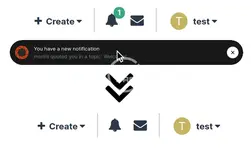
Without this plugin, when you click a popup notification, either at the bottom of the page (toasts) or in the OS (web notifications), you are taken to that item but the count on the notification icon is not updated and the notification remains marked as unread.

This plugin fixes that behaviour, so clicking the popup notification will mark that notification as read - it will no longer show up as bold in the notification list and the notification count will be decremented by one.
  • This plugin doesn't change any other behaviour.
Author
hargrave
Views
321
Extension type
zip
File size
1.5 KB
First release
Last update
Ratings 0.00 star(s) 0 ratings
Link was Broken? Please Send message to the Website Team and we will assist you quickly!
Support Developer If you are satisfied with the test or your project has earned you money, Click the More Information button to support the developer by purchasing.

More resources from hargrave

WooCommerce Help Scout H
Using WooCommerce Help Scout, connect your WooCommerce-powered online store to a Help Scout mailbox
PublishPress Capabilities Pro H
PublishPress Capabilities is trusted to manage the permissions
PublishPress Authors Pro H
PublishPress Authors Pro 4.13.0 Nulled
PublishPress Authors allows you to add multiple authors and guest authors to WordPress posts

Similar resources

Bookmarks N
IPS Bookmarks 2.0.12
Bookmarks is an easy and convenient way to save and bookmark content that you want to find later
Notification When Promoting Content Z
This resource will send a notification to the content author when their content is promoted.
Notifications Z
This resource will allow members to send notifications to other members.
Top