

- XF Compatibility
- 2.3.x
- 2.2.x
- Short Description
- Embed high-quality MP3 audio directly to your board with download feature. Download and upload contents, or use XF's default installation for seamless integration.
ITD MP3 Player – Embed MP3 Audio [XF 2.1 – 2.3]
Easily embed remotely hosted MP3 audio files in your XenForo forum with a clean, responsive HTML5 player. Perfect for music communities, podcast discussions, audiobook forums, and language learning groups.
✨ Features
• Simple BB Code: [itdmp3]https://example.com/audio.mp3[/itdmp3]
• Native HTML5 audio player with browser controls
• Download option for users (if server headers allow)
• Fully responsive & mobile-friendly
• Zero external dependencies or third-party libraries
• No branding, watermarks, or tracking
• Optional editor toolbar button
• Fully compatible with XenForo 2.1, 2.2, and 2.3
📋 Usage
[itdmp3]https://example.com/your-audio-file.mp3[/itdmp3]
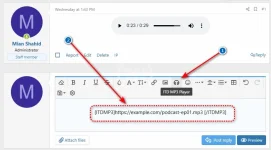
⚙️ Editor Toolbar Setup (Optional)
If you want the MP3 button to appear in the post editor, follow these two quick steps:
Step 1 – Assign an icon to the BB Code
1. Go to ACP → Content → BB Codes
2. Find itdmp3 and click Edit
3. In the Editor icon field, select Font Awesome icon
4. Enter one of the following icon names (do NOT use hex codes like f025):
• music ( recommended)
• volume-up ()
• headphones ()
• compact-disc ()
5. Click Save
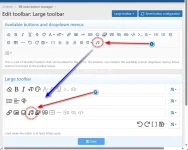
Step 2 – Add the button to the toolbar
1. Go to ACP → Content → BB Code Button Manager
2. Select the editor profile you want to modify (usually Default)
3. Find itdmp3 in the Available Buttons list
4. Drag & drop it into your desired position in the toolbar layout
5. Click Save
✅ The button will appear immediately in the editor. Rebuilding caches is optional, but recommended if you don't see changes right away.
📥 Installation
Method 1 – Archive Install (Recommended)
1. Download the add-on package
2. Go to ACP → Add-ons
3. Click Install/upgrade from archive
4. Select the downloaded .zip file
5. Click Install
Method 2 – Manual Upload
1. Upload the contents of the upload folder to your forum root directory
2. Go to ACP → Add-ons
3. Click Install next to ITD MP3
✅ That's it! No extra configuration required.
💡 Examples
[itdmp3]https://example.com/podcast-ep01.mp3[/itdmp3]
[itdmp3]https://example.com/audiobook-ch03.mp3[/itdmp3]
❓ FAQ
Q: The editor icon isn't showing?
A: Ensure you entered a valid Font Awesome name (e.g., music), not a hex code. Then add the button via the BB Code Button Manager.
Q: Can I use locally hosted files?
A: Yes, as long as the file URL is publicly accessible (e.g., https://yourdomain.com/audio.mp3).
Q: Does it support OGG or WAV?
A: This version supports MP3 only. Additional format support may be added in future releases.
Q: Will this work on mobile?
A: Yes! The HTML5 player is fully responsive and works on all modern mobile browsers.
🛟 Support
• Bug reports & feature requests: Please start a discussion thread or send a PM
• Documentation: See above
• Tested on XF 2.1.12, 2.2.14, and 2.3.0
📜 Version History
v2.1.0 – May 15, 2026
✓ XenForo 2.2 & 2.3 compatibility added
✓ Editor icon support via BB Code settings
✓ BB Code Button Manager integration guide
✓ Improved HTML5 player responsiveness
✓ Cache rebuild noted as optional
✓ Updated documentation & FAQ
v2.0.0 – Mar 14, 2020
✓ Initial release
✓ HTML5 audio player implementation
✓ Download option for users
✓ Simple BB Code implementation
📜 License
✓ Free to use on your XenForo-powered forum (personal or commercial)
✓ Free to modify for your own forum's needs
✓ Credit to the original author appreciated but not required
✗ Cannot resell or redistribute as a standalone resource
✗ Cannot claim as your own original work
✗ Cannot use in a competing resource marketplace
This resource is provided "as is" without warranty of any kind.
Easily embed remotely hosted MP3 audio files in your XenForo forum with a clean, responsive HTML5 player. Perfect for music communities, podcast discussions, audiobook forums, and language learning groups.
✨ Features
• Simple BB Code: [itdmp3]https://example.com/audio.mp3[/itdmp3]
• Native HTML5 audio player with browser controls
• Download option for users (if server headers allow)
• Fully responsive & mobile-friendly
• Zero external dependencies or third-party libraries
• No branding, watermarks, or tracking
• Optional editor toolbar button
• Fully compatible with XenForo 2.1, 2.2, and 2.3
📋 Usage
[itdmp3]https://example.com/your-audio-file.mp3[/itdmp3]
⚙️ Editor Toolbar Setup (Optional)
If you want the MP3 button to appear in the post editor, follow these two quick steps:
Step 1 – Assign an icon to the BB Code
1. Go to ACP → Content → BB Codes
2. Find itdmp3 and click Edit
3. In the Editor icon field, select Font Awesome icon
4. Enter one of the following icon names (do NOT use hex codes like f025):
• music ( recommended)
• volume-up ()
• headphones ()
• compact-disc ()
5. Click Save
Step 2 – Add the button to the toolbar
1. Go to ACP → Content → BB Code Button Manager
2. Select the editor profile you want to modify (usually Default)
3. Find itdmp3 in the Available Buttons list
4. Drag & drop it into your desired position in the toolbar layout
5. Click Save
✅ The button will appear immediately in the editor. Rebuilding caches is optional, but recommended if you don't see changes right away.
📥 Installation
Method 1 – Archive Install (Recommended)
1. Download the add-on package
2. Go to ACP → Add-ons
3. Click Install/upgrade from archive
4. Select the downloaded .zip file
5. Click Install
Method 2 – Manual Upload
1. Upload the contents of the upload folder to your forum root directory
2. Go to ACP → Add-ons
3. Click Install next to ITD MP3
✅ That's it! No extra configuration required.
💡 Examples
[itdmp3]https://example.com/podcast-ep01.mp3[/itdmp3]
[itdmp3]https://example.com/audiobook-ch03.mp3[/itdmp3]
❓ FAQ
Q: The editor icon isn't showing?
A: Ensure you entered a valid Font Awesome name (e.g., music), not a hex code. Then add the button via the BB Code Button Manager.
Q: Can I use locally hosted files?
A: Yes, as long as the file URL is publicly accessible (e.g., https://yourdomain.com/audio.mp3).
Q: Does it support OGG or WAV?
A: This version supports MP3 only. Additional format support may be added in future releases.
Q: Will this work on mobile?
A: Yes! The HTML5 player is fully responsive and works on all modern mobile browsers.
🛟 Support
• Bug reports & feature requests: Please start a discussion thread or send a PM
• Documentation: See above
• Tested on XF 2.1.12, 2.2.14, and 2.3.0
📜 Version History
v2.1.0 – May 15, 2026
✓ XenForo 2.2 & 2.3 compatibility added
✓ Editor icon support via BB Code settings
✓ BB Code Button Manager integration guide
✓ Improved HTML5 player responsiveness
✓ Cache rebuild noted as optional
✓ Updated documentation & FAQ
v2.0.0 – Mar 14, 2020
✓ Initial release
✓ HTML5 audio player implementation
✓ Download option for users
✓ Simple BB Code implementation
📜 License
✓ Free to use on your XenForo-powered forum (personal or commercial)
✓ Free to modify for your own forum's needs
✓ Credit to the original author appreciated but not required
✗ Cannot resell or redistribute as a standalone resource
✗ Cannot claim as your own original work
✗ Cannot use in a competing resource marketplace
This resource is provided "as is" without warranty of any kind.


![[ITD] Attachment Icons II](/data/resource_icons/0/57.jpg?1720149239)
![[ITD] Embed Sharing from Crazy Games](/data/resource_icons/0/118.jpg?1720149239)
![[ITD] Embed Sharing from IMDB](/data/resource_icons/0/99.jpg?1720149239)