

- XF Compatibility
- 2.2.x
- 2.3.x
- Short Description
- Adds "Can hide adverts" permission for user groups. Flexible and extensible for complex advert management. Compatible with XenForo 2.x.
Adds a permission setting "Can hide adverts" to assign user groups permissions to hide adverts. This is intended to be used with paid upgrades so that users can pay to hide adverts.
Note that the functionality of this addon is largely able to be reproduced using only the advertising management system that is a core part of XenForo 2.x. This addon simply provides an alternative approach to managing these permissions which is more flexible and extensible - especially for more complex advert management systems which do not use the core advertising placements.
A specific feature of this addon which is not available in the core, is the ability for users to over-ride the advert hiding mechanism allowing them to show the adverts.
I use this functionality to show adverts to myself so I know what is displaying and what isn't, while other admins automatically have adverts hidden. Similarly, my "business" members who pay to show their own adverts on the site while also getting the ability to hide adverts when browsing - might choose to temporarily show adverts so that they can check how their adverts display.
New permission:

User preference:

How to use:
For use with account upgrades, ensure that the Registered usergroup has the Can hide adverts permission set to "No". Then for any upgrade usergroups, plus moderators and administrators (assuming you want to hide ads for them), set the Can hide adverts permission to "Yes".
Any advertisement placement you want to use with these permissions, should be placed within an "if" statement in the template which checks the $xf.visitor.show_adverts flag.
This can also be used for the display settings on widgets.
show_adverts will be set to true when:
Options:
There are two options allowing you to customise the display of adverts.
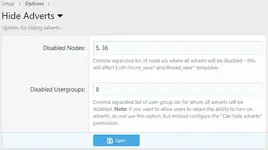
Disabled Nodes is a comma separated list of nodes which should never show adverts. This affects all "forum_view*" and "thread_view*" templates.
Disabled Usergroups is a comma separated list of usergroups who should never see adverts. This overrides the "Can hide adverts" permissions - so do not use this setting for usergroups where you want a user to retain the ability to show adverts.
Note that the functionality of this addon is largely able to be reproduced using only the advertising management system that is a core part of XenForo 2.x. This addon simply provides an alternative approach to managing these permissions which is more flexible and extensible - especially for more complex advert management systems which do not use the core advertising placements.
A specific feature of this addon which is not available in the core, is the ability for users to over-ride the advert hiding mechanism allowing them to show the adverts.
I use this functionality to show adverts to myself so I know what is displaying and what isn't, while other admins automatically have adverts hidden. Similarly, my "business" members who pay to show their own adverts on the site while also getting the ability to hide adverts when browsing - might choose to temporarily show adverts so that they can check how their adverts display.
New permission:
User preference:
How to use:
For use with account upgrades, ensure that the Registered usergroup has the Can hide adverts permission set to "No". Then for any upgrade usergroups, plus moderators and administrators (assuming you want to hide ads for them), set the Can hide adverts permission to "Yes".
Any advertisement placement you want to use with these permissions, should be placed within an "if" statement in the template which checks the $xf.visitor.show_adverts flag.
This can also be used for the display settings on widgets.
show_adverts will be set to true when:
- the user does not have permission to hide adverts
- the user does have permission to hide adverts, but has deselected the "Hide adverts" checkbox in their preferences
PHP:
     <xf:if is="$xf.visitor.show_adverts">
Advert goes here
</xf:if>
Options:
There are two options allowing you to customise the display of adverts.
Disabled Nodes is a comma separated list of nodes which should never show adverts. This affects all "forum_view*" and "thread_view*" templates.
Disabled Usergroups is a comma separated list of usergroups who should never see adverts. This overrides the "Can hide adverts" permissions - so do not use this setting for usergroups where you want a user to retain the ability to show adverts.


![[TH] UI.X 2](/data/resource_icons/0/327.jpg?1720149240)
![[AndyB] Hide Signature](/data/resource_icons/4/4677.jpg?1733573883)
![[cXF] Hide attachments with notice](/data/resource_icons/19/19632.jpg?1720149334)
![[cXF] Hide profile page](/data/resource_icons/19/19633.jpg?1720149334)