

- Short Description
- Easily shorten URLs directly from Firefox with our Premium URL Shortener extension. Customize colors, domains, and more. Test before submission to Mozilla Add-ons for seamless integration. Download companion plugin for easy management.
Firefox Extension for Premium URL Shortener
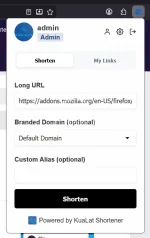
Firefox Extension for Premium URL Shortener allows you and your users to shorten links directly from your Firefox browser. This extension is developed by KuaLat Team and is packed with useful features to make URL shortening faster, easier, and more convenient.
Features
Shorten URLs directly from your Firefox browser.
Use custom domains and custom aliases.
View your recently shortened links.
Context menu integration for quickly shortening selected links or current page URLs.
Customization
After you have purchased the extension, you will receive an email containing access to our client portal. From the portal, you can customize the extension color scheme, upload your logo, and generate a complete Firefox extension package ready to be submitted to Mozilla Add-ons.
After you have downloaded the package, you will see 3 files:
A zip file named firefoxextension.zip
Another zip file named firefoxextensionhelper.zip
Firefox Extension
firefoxextension.zip
This file is the one you submit to Mozilla Add-ons. It is already packaged with the extension files, your custom stylesheet, and your logos. Everything is prepared for you, so you do not need to edit anything manually.
Testing the Extension
You can test the Firefox extension before submitting it to Mozilla Add-ons. To do so, follow these steps:
Extract the file firefoxextension.zip into a folder.
Open Firefox and navigate to:
about:debugging#/runtime/this-firefox
Click Load Temporary Add-on.
Select the extension manifest file from the extracted extension folder.
Once loaded, you should see your extension listed under Temporary Extensions.
Click the extension icon in Firefox to test its functionality.
Test the extension by shortening URLs and checking whether the generated short links work correctly.
If you make changes to the extension code, reload the temporary add-on from the debugging page.
Submitting the Extension to Mozilla Add-ons
Go to the Mozilla Add-ons Developer Hub and create a new extension submission.
Upload the file named firefoxextension.zip.
Mozilla may ask you to provide explanations for some permissions used by the extension. You can use the sample justifications below and adjust them if needed.
Wait for Mozilla to review and approve the extension.
Once approved, the extension will be available on Mozilla Add-ons.
After the extension is published, download and install it from Mozilla Add-ons to test the final public version.
Test the extension by shortening URLs and verifying that all features work as expected.
Sample Justification for Mozilla Add-ons Submission
Mozilla may ask you to explain why the extension requires certain permissions. You can use the following explanations or rewrite them in your own words.
Single Purpose
This extension’s single purpose is to provide a convenient way for users to shorten URLs using a specific URL shortening service. It allows users to shorten the current page URL, shorten selected links, and view their recently shortened links.
The extension is developed by KuaLat Team to help users access URL shortening features directly from Firefox without needing to manually open the URL shortener website.
activeTab Permission Justification
The activeTab permission is used to access the current tab’s URL only when the user chooses to shorten the current page.
This allows the extension to automatically populate the long URL field with the current page address, improving the user experience.
The extension does not automatically send any information to the server. The user must click the Shorten button before any URL is sent to the URL shortening service for processing.
All generated links are securely stored in the user’s account.
storage Permission Justification
The storage permission is used to store the user’s API key locally in the browser.
This allows the extension to authenticate API requests to the URL shortening service without requiring the user to enter the API key repeatedly.
We do not use this permission to store unrelated personal information.
contextMenus Permission Justification
The contextMenus permission is used to add a Shorten Link option to the Firefox right-click menu.
This allows users to quickly shorten links without opening the extension popup.
The implementation can be found in the background script file.
The extension does not automatically send any selected link to the server. The user must confirm the shortening action before the link is sent to the URL shortening service for processing.
All generated links are securely stored in the user’s account.
Host Permission Justification
The host permission is required to make API calls to the URL shortening service.
This permission is essential for the core functionality of the extension, including shortening URLs, retrieving recently shortened links, and communicating with the user’s account securely.
The extension only communicates with the required URL shortening service endpoint and does not access unrelated websites.
Support
If you are having trouble submitting the extension or have any questions, DM me.
Companion Plugin
firefoxextensionhelper.zip
The file named firefoxextensionhelper.zip is the companion plugin for the Firefox extension.
This plugin allows you to add the Mozilla Add-ons page link after your Firefox extension has been approved. Once configured, the extension will appear under Integrations in the dashboard and under the Resources menu on the homepage.
How to Install the Companion Plugin
You can install the companion plugin by following these steps:
Go to your site Admin area.
Navigate to Plugins.
Open All Plugins.
Click Upload and upload the file named firefoxextensionhelper.zip.
Click the three dots menu, then choose Activate.
Go to Admin > Plugins > Firefox Extension.
Enter your Mozilla Add-ons page link.
Save the changes.
Your Firefox extension link will now be displayed in the appropriate dashboard and homepage sections.


