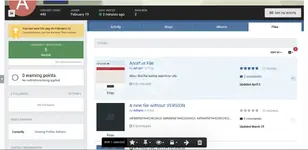
Files Tab on User Profile

Files Tab on User Profile 1.0.2

No permission to download
Short Description
his resource will restore the FILES tab on user profile.
Files Tab on User Profile.webp

This resource will restore the FILES tab on user profile.

Requirement:
  • Downloads app
Settings:
  • Display TAB if the member has no file submitted
  • Number of files per page
  • Display Files TAB to chosen groups
  • Display Files TAB from chosen groups
  • Honor pinned files
  • Hide Moderator options
Important Notice:
  • If you used the previous version of this resource (which was a plugin), follow the steps before install this application:
    1. Uninstall the plugin
    2. Via FTP, delete the following file from your file system: applications/downloads/extensions/core/Profile/Files.php.
    3. Install this application
Author
hargrave
Views
399
Extension type
zip
File size
4.1 KB
First release
Last update
Ratings 0.00 star(s) 0 ratings
Link was Broken? Please Send message to the Website Team and we will assist you quickly!
Support Developer If you are satisfied with the test or your project has earned you money, Click the More Information button to support the developer by purchasing.

More resources from hargrave

WooCommerce Help Scout H
Using WooCommerce Help Scout, connect your WooCommerce-powered online store to a Help Scout mailbox
PublishPress Capabilities Pro H
PublishPress Capabilities is trusted to manage the permissions
PublishPress Authors Pro H
PublishPress Authors Pro 4.13.0 Nulled
PublishPress Authors allows you to add multiple authors and guest authors to WordPress posts

Similar resources

Images Tab on User Profile A
This resource will create a new tab in the user's profile to display all images posted by the user
Profile Tabs Organizer Z
This plugin will allow admins to choose which tabs to display in users profile and set their orderin
(k4) Titles from Files by Links A
allows you to correctly display information in downloads (Add files by URL)
Top