
![[cXF] Icons in sidenav on Account page](/data/resource_icons/19/19736.jpg?1720149334)
- XF Compatibility
- 2.2.x
- 2.3.x
- Short Description
- Add custom icons to your Account page with Font Awesome 5 Pro styles in XenForo via extra.less. Customize for XF2.2 & 2.3 or use Brand icons without specifying in 2.3. Adjust route filters as needed.
Would you like to have icons in sidenav on Account page like this?
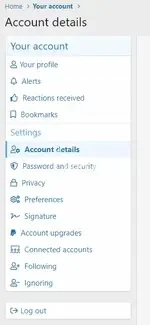
Add this to your extra.less template:
Add this to your extra.less template:
Code:
/* Icons in sidenav on Account page */...
You do not have permission to view the full content of this resource.
Log in or register now.


![[cXF] Coloured Node Icons](/data/resource_icons/19/19740.jpg?1720149334)
![[cXF] Icons in Visitor menu](/data/resource_icons/19/19739.jpg?1720149334)
![[cXF] Node icons with image](/data/resource_icons/21/21023.jpg?1720551794)