Camera Raw Settings [23 Preset]

Camera Raw Settings [23 Preset] 2021-07-25

No permission to download
Short Description
Camera Raw Settings [23 Preset]
1. Open your image in Photoshop. Click on Filter and choose Camera Raw Filter ...
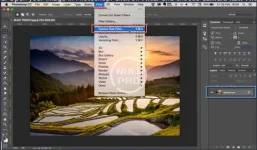
07202125_85.webp

2. Click on the right side of Basic menu (Green Circle). Then, choose Load Settings...
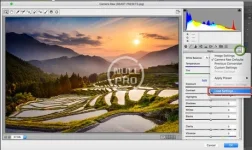
07202125_86.webp

3. Choose .xmp file from downloaded and unzipped folder. Then click on Load button.
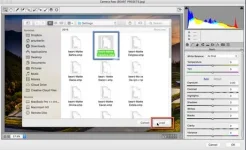
07202125_87.webp

4. To apply effect, click on OK button.
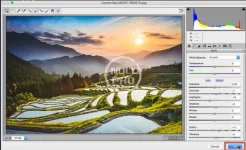
07202125_88.webp
Author
anne
Views
416
First release
Last update
Ratings 0.00 star(s) 0 ratings
Link was Broken? Please Send message to the Website Team and we will assist you quickly!
Support Developer If you are satisfied with the test or your project has earned you money, Click the More Information button to support the developer by purchasing.

More resources from anne

YOOtheme Pro Joomla A
YOOtheme Pro - The most powerful Joomla theme and page builder.
Residence Real Estate WordPress Theme A
WP Residence Real Estate WordPress Theme is a premium theme designed for independent agents.
User Registration Pro A
User Registration Pro 6.1.4 Nulled
User Registration - Best WordPress Registration form plugin

Similar resources

25 Moody Portrait Lightroom Presets A
Moody Landscape Lightroom Presets is a powerful Collection of professional Travel Blogger Lightroom
450 Zoodle Hand Drawn Illustrations C
Dive into a world of fun with Zoodle Hand-Drawn Illustrations!
Artistic Collection - Metal Lightroom Preset (Mobile & Desktop) D
The preset is universal and suitable for any kind of photo so you can be free to experiment
Top