

- Short Description
- Andy-MembersRecentlyOnline displays a block of recently active members. Features include easy installation via zip file upload, customizable widget placement in forums, and user group permissions for visibility. Adjust minutes shown or view as admin to see all users.
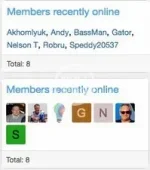
Displays a block containing members recently online.
Features:
All phrases start with membersrecentlyonline_ for your convenience.
Installation:
- Download Andy-MembersRecentlyOnline-1.7.zip and unzip it.
- Copy the src/addons/Andy/MembersRecentlyOnline directory to your server.
- From the Admin Control Panel Install the add-on.
- Admin Control Panel -> Appearance -> Widgets
- Widget definition = Members recently online
- Widget key = members_recently_online
- Title = (leave blank)
- Display in positions = Forum list: Sidebar
- Click Save.
Normally you will select Yes to the following User groups:
Registered
Unregistered / Unconfirmed
Questions and Answers:
Q: How can I reduce the number of members shown?
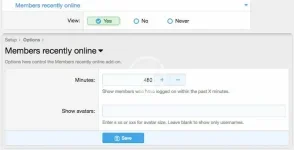
A: Adjust the Minutes in the Options page.
Q: Does this add-on honor the "Show your online status" in the users preferences?
A: Yes.
Q: How can I see those members which have "Show online status" disabled?
A: Set the Administrative group (View as admin) to Yes.
Q: Why are some usernames a lighter color?
A: Those are members which have "Show your online status" unchecked and you have View as admin permission.
Q: Why are some avatars have an opaque?
A: Those are members which have "Show your online status" unchecked and you have View as admin permission


![[Sysnative] Improved Member Stats Widgets - Members Recently Online / Recently Registered](/data/resource_icons/0/66.jpg?1720149239)
![[AndyB] New members](/data/resource_icons/4/4548.jpg?1720149262)
![[AndyB] Inactive Members](/data/resource_icons/4/4352.jpg?1720149256)