
![[AndyB] Countdown timer](/data/resource_icons/20/20787.jpg?1720149340)
- XF Compatibility
- 2.3.x
- Short Description
- Countdown Timer Widget - Set up easily from Appearance tab in Admin Control Panel. Configure user group permissions for access control. Create events threads and set timers directly via admin page. Manage timezones and update latest thread automatically.
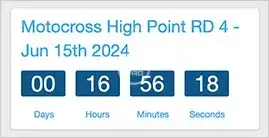
Displays a Countdown timer widget.
(Example of Countdown timer widget)
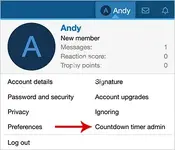
(Example of Countdown timer admin link)
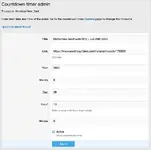
(Example of Countdown timer admin page)
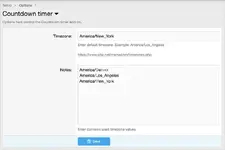
(Example of Options page)
(Example of User group permissions)

Features:
Example of User group permissions:
Administrative = Admin
Registered = View
Unregistered / Unconfirmed = View
How to use:
Q: How are timezones dealt with?
A:You can select the timezone of the event in the countdown timer options page.
Q: What does the "Update to latest thread" link do?
A: Clicking this link will update the first two fields "Title" and "Link" with the latest thread you created.
(Example of Countdown timer widget)
(Example of Countdown timer admin link)
(Example of Countdown timer admin page)
(Example of Options page)
(Example of User group permissions)
Features:
- All phrases start with countdowntimer_ for your convenience.
- From the Admin Control Panel select the Widgets under the Appearance tab.
- Click the Add widgets button.
- Select the Countdown timer widget.
- Widget key = countdown_timer
- Title = (leave blank)
- Display in positions = Forum list: Sidebar
- Click Save.
Example of User group permissions:
Administrative = Admin
Registered = View
Unregistered / Unconfirmed = View
How to use:
- Create a thread about the event.
- Go to your Visitor tab drop down and click the Countdown timer admin link. There you will be able to set a Countdown timer for the event.
Q: How are timezones dealt with?
A:You can select the timezone of the event in the countdown timer options page.
Q: What does the "Update to latest thread" link do?
A: Clicking this link will update the first two fields "Title" and "Link" with the latest thread you created.


![[AndyB] Countdown](/data/resource_icons/0/776.jpg?1720149240)
![[AndyB] Advertising responsive](/data/resource_icons/7/7380.jpg?1720149273)
![[AndyB] Cube](/data/resource_icons/11/11639.jpg?1720149296)