

- XF Compatibility
- 2.3.x
- Short Description
- AIXF Media360 — Enhance your XenForo media gallery with 360° panoramic images. Drop-in, no core edits needed; zoom, fullscreen controls, and auto-rotate options included for seamless viewing experience. Supports both CDN and local assets.
NOTE: I don't own anything Apple, so I have not tested it on anything Apple. Part of the reason it is beta. This doesn't work in lightbox. You have to view them without it.
# AIXF Media360 — 360° Panoramas for XenForo Media Gallery
AIXF Media360 makes 360° (equirectangular) images feel native in XenForo Media Gallery.
It detects panoramic images and replaces the static photo with an interactive, draggable 360° viewer (powered by Pannellum) — right inside the standard media view.
✅ Drop-in; no core file edits
✅ Zoom & fullscreen controls
✅ Gentle auto-rotate (optional)
✅ Works with plain JPG equirectangular (2:1 aspect), e.g. 4096×2048 or 8192×4096
✅ CDN or local assets (your choice)
---
## Install
1. Upload the release ZIP via Admin CP → Add-ons → Install/upgrade from archive.
2. After install, visit Media Gallery → any image that’s an equirectangular pano (2:1).
You should see drag-to-look, plus zoom and fullscreen controls.
### Using CDN (default)
The add-on loads Pannellum from a public CDN. No extra files or steps.
### Using local files (optional)
If your CSP blocks CDNs:
- Place local Pannellum files in the add-on (these are included if you used the “local” build):
/js/aixf/media360/pannellum.min.js
/styles/aixf/media360/pannellum.css
- In ACP → Options → AIXF Media360 (if you exposed an option), set Use CDN = Off.
If you didn’t add an ACP option, set data-cdn="0" in the mount (see “How it works”).
## How it works (short version)
On the media view page (public:xfmg_media_view), the add-on injects a small mount div and a boot script.
The script waits for the original <img>, checks if it’s ~2:1, hides it, and mounts Pannellum with the same image
URL.
You can control behavior via data-* flags on the mount.
Example mount (already injected by the add-on; shown here for reference):
Recommended image sizes
EXR/HDR are not required for this viewer (you can use tonemapped JPGs).
---
## Troubleshooting
I only see a still image.
Most likely the image isn’t ~2:1. Check dimensions (e.g., 4096×2048). You can widen data-ratio-tolerance (e.g. 0.08) if your source is slightly off 2:1.
I can drag, but no buttons.
The Pannellum CSS isn’t loaded. If you’re on CDN, ensure it isn’t blocked. For local mode, confirm this URL works in your browser:
Switch to local mode (see above), or loosen CSP for the CDN domain.
Lazy-load warnings.
The script waits for the actual <img> to finish loading; lazy-loading is fine. If your theme swaps the image node late, a short flicker can happen.
## Roadmap (feedback-driven)

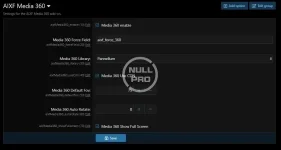
# AIXF Media360 — 360° Panoramas for XenForo Media Gallery
AIXF Media360 makes 360° (equirectangular) images feel native in XenForo Media Gallery.
It detects panoramic images and replaces the static photo with an interactive, draggable 360° viewer (powered by Pannellum) — right inside the standard media view.
✅ Drop-in; no core file edits
✅ Zoom & fullscreen controls
✅ Gentle auto-rotate (optional)
✅ Works with plain JPG equirectangular (2:1 aspect), e.g. 4096×2048 or 8192×4096
✅ CDN or local assets (your choice)
---
## Install
1. Upload the release ZIP via Admin CP → Add-ons → Install/upgrade from archive.
2. After install, visit Media Gallery → any image that’s an equirectangular pano (2:1).
You should see drag-to-look, plus zoom and fullscreen controls.
### Using CDN (default)
The add-on loads Pannellum from a public CDN. No extra files or steps.
### Using local files (optional)
If your CSP blocks CDNs:
- Place local Pannellum files in the add-on (these are included if you used the “local” build):
/js/aixf/media360/pannellum.min.js
/styles/aixf/media360/pannellum.css
- In ACP → Options → AIXF Media360 (if you exposed an option), set Use CDN = Off.
If you didn’t add an ACP option, set data-cdn="0" in the mount (see “How it works”).
## How it works (short version)
On the media view page (public:xfmg_media_view), the add-on injects a small mount div and a boot script.
The script waits for the original <img>, checks if it’s ~2:1, hides it, and mounts Pannellum with the same image
URL.
You can control behavior via data-* flags on the mount.
Example mount (already injected by the add-on; shown here for reference):
HTML:
<div id="aixfPanoMount" class="js-aixf360"
data-enabled="1"
data-cdn="1" <!-- 1 = CDN (default), 0 = local -->
data-fov="75" <!-- initial zoom (HFOV) -->
data-autorotate="1.2" <!-- deg/sec; 0 = off -->
data-fullscreen="1" <!-- show fullscreen button -->
data-ratio-tolerance="0.05" <!-- 2:1 detection tolerance -->
style="width:100%;height:60vh"></div>
Recommended image sizes
- 4096×2048 (4K) — best compatibility across devices
- 8192×4096 (8K) — sharper on desktop; larger files
EXR/HDR are not required for this viewer (you can use tonemapped JPGs).
---
## Troubleshooting
I only see a still image.
Most likely the image isn’t ~2:1. Check dimensions (e.g., 4096×2048). You can widen data-ratio-tolerance (e.g. 0.08) if your source is slightly off 2:1.
I can drag, but no buttons.
The Pannellum CSS isn’t loaded. If you’re on CDN, ensure it isn’t blocked. For local mode, confirm this URL works in your browser:
Console shows 404 for init.js or pannellum.js.
- Using <xf:js src="aixf/media360/init.js" /> is correct (don’t prefix with js/).
- If you built your own ZIP, ensure your release includes:
CDN blocked by CSP.
Switch to local mode (see above), or loosen CSP for the CDN domain.
Lazy-load warnings.
The script waits for the actual <img> to finish loading; lazy-loading is fine. If your theme swaps the image node late, a short flicker can happen.
## Roadmap (feedback-driven)
- GPano/XMP EXIF detection (beyond 2:1 ratio)
- Mobile gyroscope (orientationOnByDefault)
- “Share this view” deep links (yaw/pitch/hfov in URL)
- Hotspots (titles/links)
- Optional XenAddons Showcase support


![[AndyB] Featured media](/data/resource_icons/1/1409.jpg?1720149245)
![[AndyB] Convert image media gallery](/data/resource_icons/7/7400.jpg?1720149273)
![[AndyB] Convert image media gallery all](/data/resource_icons/14/14460.jpg?1720149306)