

- XF Compatibility
- 2.2.x
- 2.3.x
- Short Description
- For a private site where no forum content is visible to guests, the easy way to hide everything
For a private site where no forum content is visible to guests, the easy way to hide everything is to simply deny "View" permission to Unregistered / Unconfirmed users.
However, the end result is a little messy as guest visitors get presented by an unhelpful error message "You must be logged-in to do that" and a login form, and the page returns a 403 (Forbidden) error.
This simple addon provides an alternative approach with a cleaner and more elegant outcome.
The following UI changes are made by installing this addon:
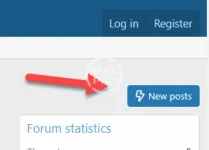
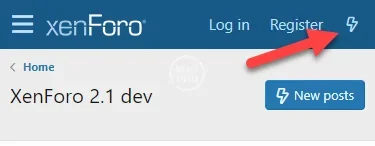
Hides "What's new" header link on mobile:
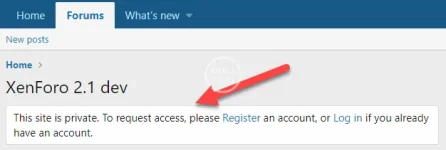
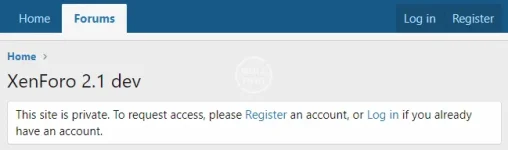
Displays a customisable message to guests below the site title:
There are a few other customisations that should be made to clean up a private site to make this addon work as expected - a tutorial has been provided describing the steps required to obtain the optimal outcome for guests viewing a private site: https://xenforo.com/community/resources/how-to-make-a-xenforo-forum-private-no-guest-access.7844/
Configuration steps:
1. change user permissions
To use this addon, you must change your user permissions to allow Unregistered / Unconfirmed users access to view the site (but not the content).
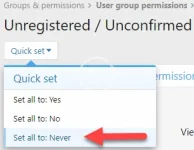
As per the tutorial (see step 4) - use Quick set to set all permissions to "Never" for Unregistered / Uncofirmed users:
Then set the "View" permission to "Yes" so they can see the site (but no content).

Now guests can see the forum home, but no content.
2. install this addon
3. customise (or remove) guest message in options
4. tidy up navigation and widget display for guests
Follow instruction in the tutorial.
End result:
The end result of installing this addon and following the tutorial steps is a nice clean interface for guests visiting a private site:
However, the end result is a little messy as guest visitors get presented by an unhelpful error message "You must be logged-in to do that" and a login form, and the page returns a 403 (Forbidden) error.
This simple addon provides an alternative approach with a cleaner and more elegant outcome.
The following UI changes are made by installing this addon:
- a customisable message is displayed to guests below the site title
- hides the "New posts" button for guests and anyone without a valid user_state
- hides the "What's new" link from the header on mobile devices for guests and anyone without a valid user_state
Hides "What's new" header link on mobile:
Displays a customisable message to guests below the site title:
There are a few other customisations that should be made to clean up a private site to make this addon work as expected - a tutorial has been provided describing the steps required to obtain the optimal outcome for guests viewing a private site: https://xenforo.com/community/resources/how-to-make-a-xenforo-forum-private-no-guest-access.7844/
Configuration steps:
1. change user permissions
To use this addon, you must change your user permissions to allow Unregistered / Unconfirmed users access to view the site (but not the content).
As per the tutorial (see step 4) - use Quick set to set all permissions to "Never" for Unregistered / Uncofirmed users:
Then set the "View" permission to "Yes" so they can see the site (but no content).
Now guests can see the forum home, but no content.
2. install this addon
3. customise (or remove) guest message in options
4. tidy up navigation and widget display for guests
Follow instruction in the tutorial.
End result:
The end result of installing this addon and following the tutorial steps is a nice clean interface for guests visiting a private site:

![[TH] UI.X 2](/data/resource_icons/0/327.jpg?1720149240)
![[TH] UI.X 2 Dark](/data/resource_icons/0/328.jpg?1720149240)
![[AndyB] Remove website](/data/resource_icons/19/19856.jpg?1720149334)
![[BS] Private user banner](/data/resource_icons/1/1092.jpg?1720149240)
![[cXF] Remove Location, Website and About you field](/data/resource_icons/2/2436.jpg?1720149251)