

- Joomla Compatibility
- 3.x
- JoomlaOrg Link
- https://extensions.joomla.org/extension/better-trash/
- Short Description
- With Better Trash, view & delete Joomla trashed items with a single click. Pro version auto deletes after days.
In Joomla, when you want to view the trashed items, you need to open the Search Tools and set the Status selection to Trashed.
Then to delete all the trashed items, you need to select all items and click on the Empty Trash button.

With Better Trash this becomes a lot simpler!
Want to view the trashed items? Just click on the Trash button (without selecting any items).
Want to delete all trashed items in that view? Just click on the Empty Trash button (without selecting any items).
With Better Trash Pro you can also automatically delete trash after a set amount of days.
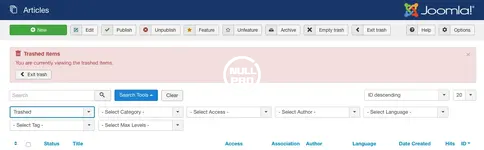
Then to delete all the trashed items, you need to select all items and click on the Empty Trash button.
With Better Trash this becomes a lot simpler!
Want to view the trashed items? Just click on the Trash button (without selecting any items).
Want to delete all trashed items in that view? Just click on the Empty Trash button (without selecting any items).
With Better Trash Pro you can also automatically delete trash after a set amount of days.


