

- Compatibilité XF
- 2.3.x
- Description courte
- NoderPay integrates Bitcoin payments directly into XenForo with automatic verification, user upgrades, and secure webhooks. Connect your public wallet via supported XPUB/ZPUB to accept Bitcoin upgrades seamlessly. Native integration simplifies merchant management and offers a robust API for developers. Step 1 involves creating an account and connecting your wallet; follow the detailed guide at [noderpay.com](https://noderpay.com).
NoderPay gives merchants Bitcoin invoices, automatic payment detection, APIs, webhooks and ready-made integrations without requiring them to operate their own Bitcoin payment server.
No seed phrase. No private keys. Connect using supported public wallet information such as XPUB/ZPUB.
This add-on integrates XenForo directly with NoderPay, allowing you to accept Bitcoin payments for user upgrades with automatic payment verification and instant user group upgrades.
Unlike traditional payment gateways, NoderPay focuses on Bitcoin while providing a simple merchant dashboard, wallet management, invoice tracking, webhooks, and developer APIs.
Register for a free merchant account:
https://app.noderpay.com/register
After registration, verify your email and log in to your merchant dashboard.
Go to:
https://app.noderpay.com/merchant/stores
Click Create Store.
Fill in your store information and save it.
Each XenForo payment profile uses a Store ID from your NoderPay account.
Open the Wallets section inside your NoderPay dashboard.
Connect your Bitcoin wallet by entering your wallet XPUB/ZPUB.
Once your wallet has been connected successfully, your store is ready to receive Bitcoin payments.
Go to:
https://app.noderpay.com/merchant/api-keys
Click Create API Key.
Copy the generated API Key.
You'll use this API key inside XenForo.
Upload the add-on files to your XenForo installation.
Install it from:
Admin Control Panel → Add-ons
After installation, continue with the payment provider configuration.
Navigate to:
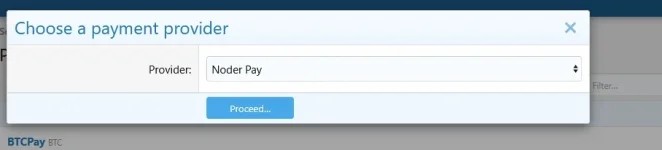
Admin CP → Payments → Payment Profiles
Click:
Add Payment Profile
Select:
NoderPay
Click:
Proceed
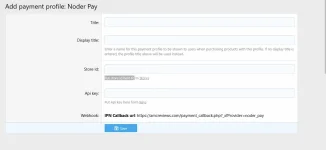
You will see the NoderPay configuration page.
Title
Example:
Code:
NoderPay
Display Title
Example:
Code:
Bitcoin
Store ID
Copy your Store ID from:
https://app.noderpay.com/merchant/stores
API Key
Copy your API Key from:
https://app.noderpay.com/merchant/api-keys
Webhook
The webhook URL is displayed automatically by XenForo.
Example:
Code:
https://yourforum.com/payment_callback.php?_xfProvider=noder_pay
You don't need to edit this URL.
Simply copy it into your NoderPay Store webhook settings.
Code:
Customer purchases a XenForo upgrade
│
▼
XenForo creates a payment request
│
▼
Customer is redirected to NoderPay
│
▼
Customer pays with Bitcoin
│
▼
NoderPay verifies the payment
│
▼
Webhook is sent back to XenForo
│
▼
User is upgraded automatically
Website:
https://noderpay.com or message me here
Merchant Dashboard:
https://app.noderpay.com
This is the first public release of the NoderPay XenForo Payment Provider.
Feedback, suggestions, bug reports, and feature requests are greatly appreciated and will help improve future releases.
Thank you for supporting NoderPay!
No seed phrase. No private keys. Connect using supported public wallet information such as XPUB/ZPUB.
This add-on integrates XenForo directly with NoderPay, allowing you to accept Bitcoin payments for user upgrades with automatic payment verification and instant user group upgrades.
Unlike traditional payment gateways, NoderPay focuses on Bitcoin while providing a simple merchant dashboard, wallet management, invoice tracking, webhooks, and developer APIs.
- Native XenForo payment provider
- Automatic Bitcoin payment verification
- Automatic user upgrades
- Secure webhook/IPN handling
- Merchant dashboard
- Store management
- Wallet management
- Invoice management
- REST API
- Self-hosted payment infrastructure behind the scenes
Step 1 — Create a NoderPay Account
Register for a free merchant account:
https://app.noderpay.com/register
After registration, verify your email and log in to your merchant dashboard.
Go to:
https://app.noderpay.com/merchant/stores
Click Create Store.
Fill in your store information and save it.
Each XenForo payment profile uses a Store ID from your NoderPay account.
Open the Wallets section inside your NoderPay dashboard.
Connect your Bitcoin wallet by entering your wallet XPUB/ZPUB.
Once your wallet has been connected successfully, your store is ready to receive Bitcoin payments.
Go to:
https://app.noderpay.com/merchant/api-keys
Click Create API Key.
Copy the generated API Key.
You'll use this API key inside XenForo.
Upload the add-on files to your XenForo installation.
Install it from:
Admin Control Panel → Add-ons
After installation, continue with the payment provider configuration.
Navigate to:
Admin CP → Payments → Payment Profiles
Click:
Add Payment Profile
Select:
NoderPay
Click:
Proceed
You will see the NoderPay configuration page.
Title
Example:
Code:
NoderPay
Display Title
Example:
Code:
Bitcoin
Store ID
Copy your Store ID from:
https://app.noderpay.com/merchant/stores
API Key
Copy your API Key from:
https://app.noderpay.com/merchant/api-keys
Webhook
The webhook URL is displayed automatically by XenForo.
Example:
Code:
https://yourforum.com/payment_callback.php?_xfProvider=noder_pay
You don't need to edit this URL.
Simply copy it into your NoderPay Store webhook settings.
Code:
Customer purchases a XenForo upgrade
│
▼
XenForo creates a payment request
│
▼
Customer is redirected to NoderPay
│
▼
Customer pays with Bitcoin
│
▼
NoderPay verifies the payment
│
▼
Webhook is sent back to XenForo
│
▼
User is upgraded automatically
- Bitcoin payments
- Merchant dashboard
- Multiple stores
- Wallet management
- Invoice management
- Automatic payment verification
- Automatic user upgrades
- REST API
- Secure webhook handling
- Fast checkout experience
- Real-time payment status
- Easy merchant onboarding
Website:
https://noderpay.com or message me here
Merchant Dashboard:
https://app.noderpay.com
This is the first public release of the NoderPay XenForo Payment Provider.
Feedback, suggestions, bug reports, and feature requests are greatly appreciated and will help improve future releases.
Thank you for supporting NoderPay!
![[CinVin] Footer Tweaks](/data/resource_icons/4/4511.jpg?1720149262)


![[JUM] Payment Providers](/data/resource_icons/0/914.jpg?1720149240)
![[OzzModz] Payment Provider: POLi](/data/resource_icons/4/4877.jpg?1720149262)
![[021] Payment provider tax](/data/resource_icons/11/11946.jpg?1720149296)